
Cómo hacer
How to interpret your campaign results
This guide explains how to read the metrics block in the report of a sent campaign: what each number means and how to tell if your campaign is performing well. About 3 minutes.
Before you start
Section titled “Before you start”You need at least one campaign already launched, in Processed status. If you haven’t launched one yet, follow How to create your first campaign first.
Step 1: Open your campaign’s report
Section titled “Step 1: Open your campaign’s report”In the side menu, click My campaigns.
In the list, every campaign carries its status. These are the ones you will come across:
| Status | What it means |
|---|---|
| Draft | Not launched yet |
| Processed | The send finished and there are results to read |
| Stopped | The send was interrupted before finishing |
| Failed | The send never went out |
Click the name of a Processed campaign. The report opens, with the report’s side menu on the left: Summary, Deliverability, Unsubscribes, Segments and Interaction.
The first section you see is the Summary.
Step 2: Read the metrics block
Section titled “Step 2: Read the metrics block”Right below the configuration details (channel, subject, sender) you’ll see four cards with the send results.
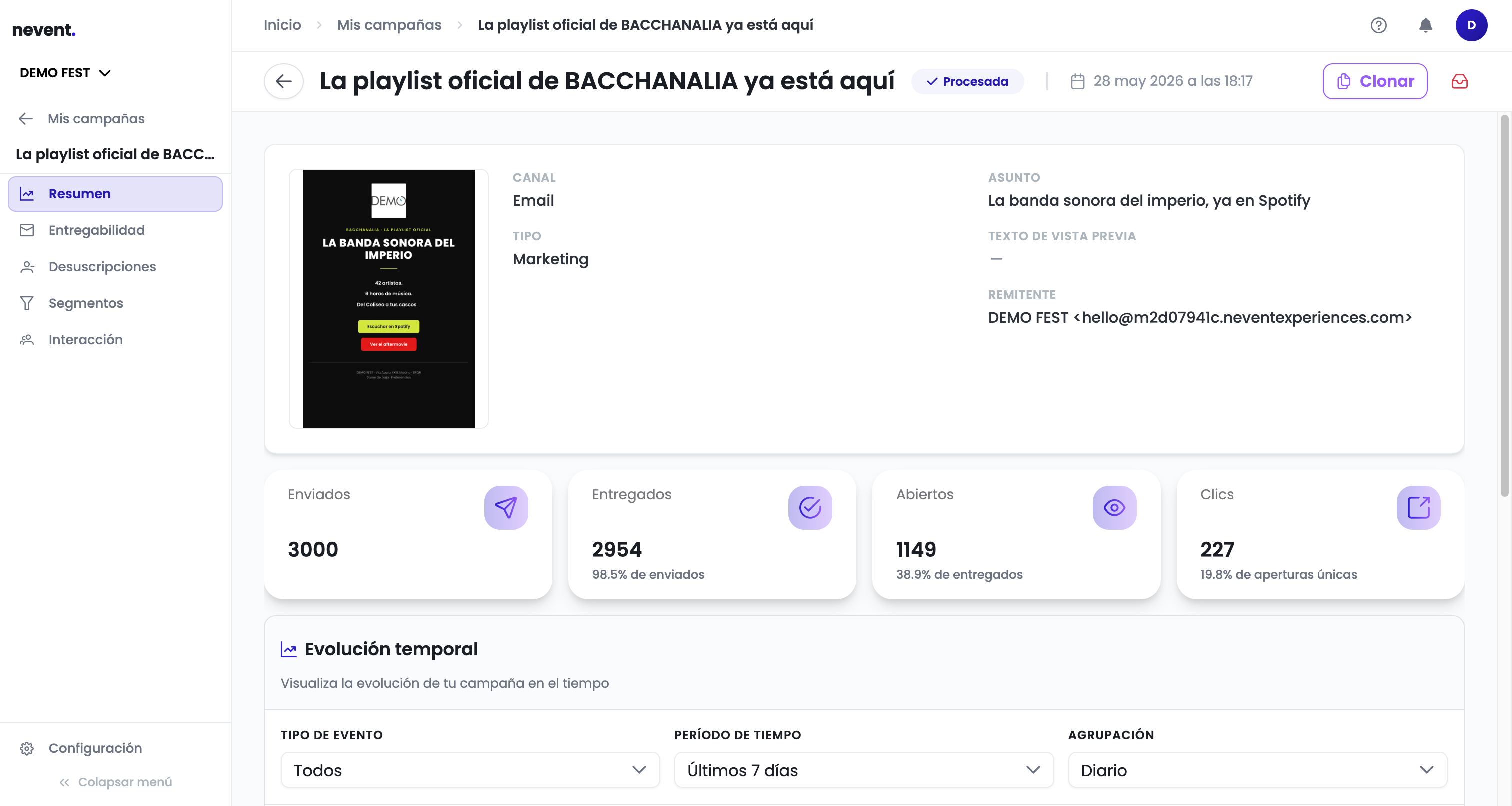
Note that each percentage states its denominator under the number: not every metric is calculated over the same base.
- Sent: the total number of emails Nevent handed to the sending service.
- Delivered: the ones the recipient’s server accepted, as a percentage of sent.
- Opened: recipients who opened the email at least once, as a percentage of delivered.
- Clicks: clicks on links in the email, as a percentage of unique opens.
If the campaign is a WhatsApp campaign
Section titled “If the campaign is a WhatsApp campaign”For a WhatsApp campaign the results block does not show opens or clicks, but the four counters Meta returns for that send:
- Sent: messages from this send that went out to Meta.
- Delivered: messages Meta reports as delivered to the recipient.
- Read: messages Meta reports as read by the recipient.
- Failed: messages Meta reports as failed.
All four counters come from Meta’s notifications about this campaign, so they update as Meta sends them.
If part of the audience was never sent, a notice below the counters shows how many recipients were not sent because Meta’s messaging limit was reached (unique recipients every 24 hours). Those contacts received nothing: you can send them another campaign once the limit frees up.
The benchmark ranges below and the report’s Deliverability section apply to email campaigns only.
How to tell if your results are good
Section titled “How to tell if your results are good”The benchmark ranges for live event campaigns are:
| Metric | Healthy result | Warning sign |
|---|---|---|
| Delivery rate | Above 95% | Below 90% |
| Open rate | Above 25% | Below 15% |
| Click rate | Above 5% | Below 2% |
The open rate depends a lot on the subject line and the timing of the send. If yours is low, try shorter or more direct subject lines in your next campaign.
The click rate measures real interest in your offer. If it’s low, check that the email has a clear, visible call-to-action button.
What to do if the results are low
Section titled “What to do if the results are low”If your open rate is below 15%:
- Review the subject line: it needs to be direct and spark curiosity.
- Check the sender name: recipients need to recognise it.
- Consider the send time: try sending on a weekday morning.
If your click rate is below 2%:
- Make sure the email has a single, prominent call-to-action button.
- Check that the link goes to the right page.
- Consider whether the audience is the right fit for the offer.