
Digital engagement: segment fans by email behaviour
A fan opening your email is already a signal. A click is a stronger one. Starting to buy a ticket and leaving halfway through is a clear recovery opportunity. This category gives you the criteria to act on each of those interest signals.
What digital engagement criteria can you use?
Section titled “What digital engagement criteria can you use?”| Criterion | What it represents | When to use it |
|---|---|---|
| Email opens | Fan who opened a specific campaign or any email in a period | To re-engage those who showed interest |
| Link clicks | Fan who clicked a link inside an email | To identify those most interested in a specific event |
| Conversions | Fan who completed the target action after a campaign (purchase, registration…) | To exclude them from the sales campaign or run an upsell |
| Abandoned cart | Fan who started the purchase process and did not complete it | To launch a recovery campaign within 24–48 hours |
| Unsubscribe | Fan who opted out of communications | To always exclude them from all sends |
| Bounce / spam complaint | Email that bounced or fan who marked the message as spam | To manage deliverability and protect your sender reputation |
The campaign activity criteria, one by one
Section titled “The campaign activity criteria, one by one”In the segment editor, under the Interaction category, there are six campaign activity criteria. Their names come from the criteria catalogue and are shown as they appear in the editor. Three work on a specific campaign and three on a campaign label:
| Criterion | What it checks | By campaign or by label |
|---|---|---|
| Campaña recibida (campaign received) | Recorded email activity in the campaign | By campaign |
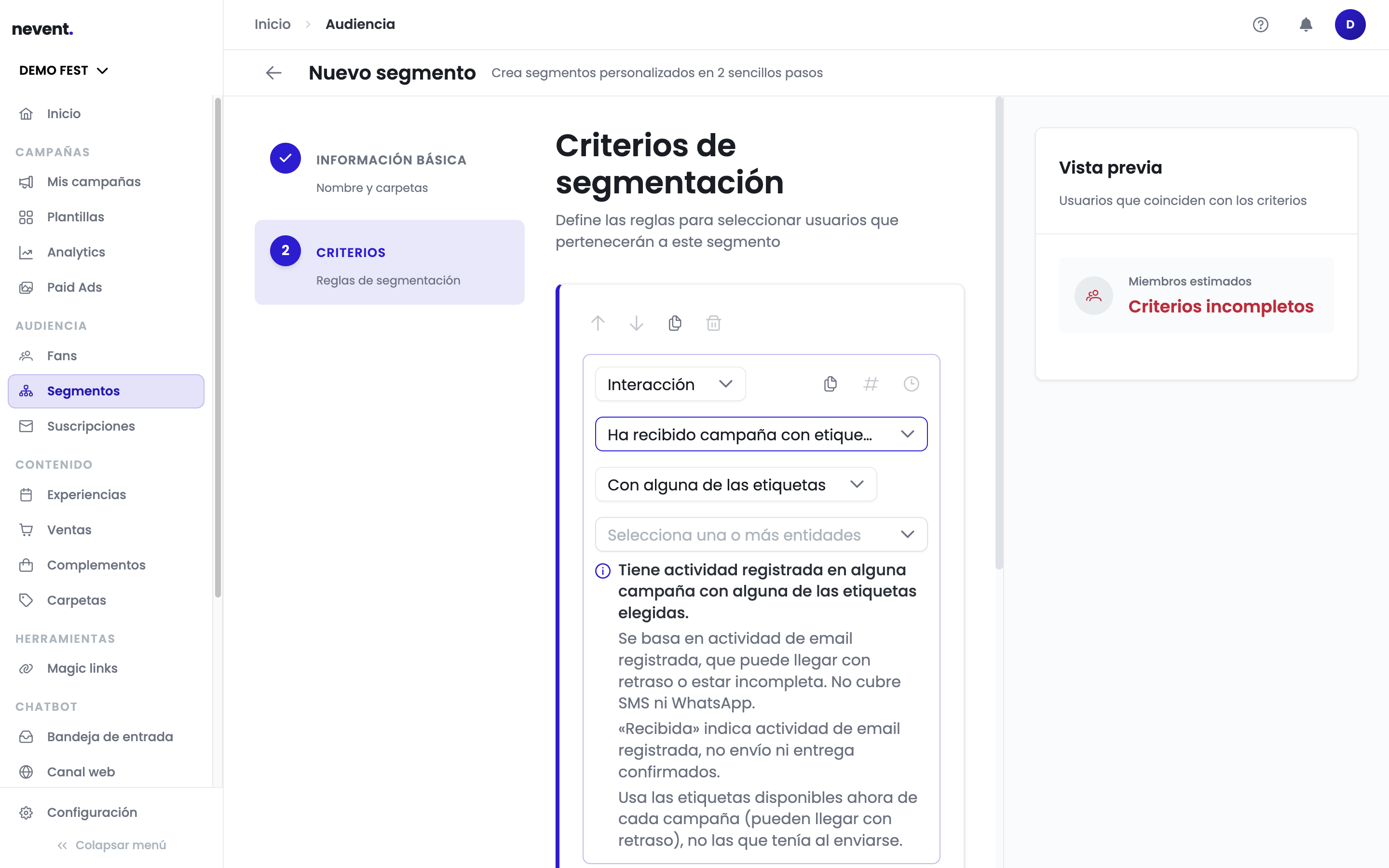
| Ha recibido campaña con etiqueta (received campaign with label) | The same, in any campaign with the chosen label | By label |
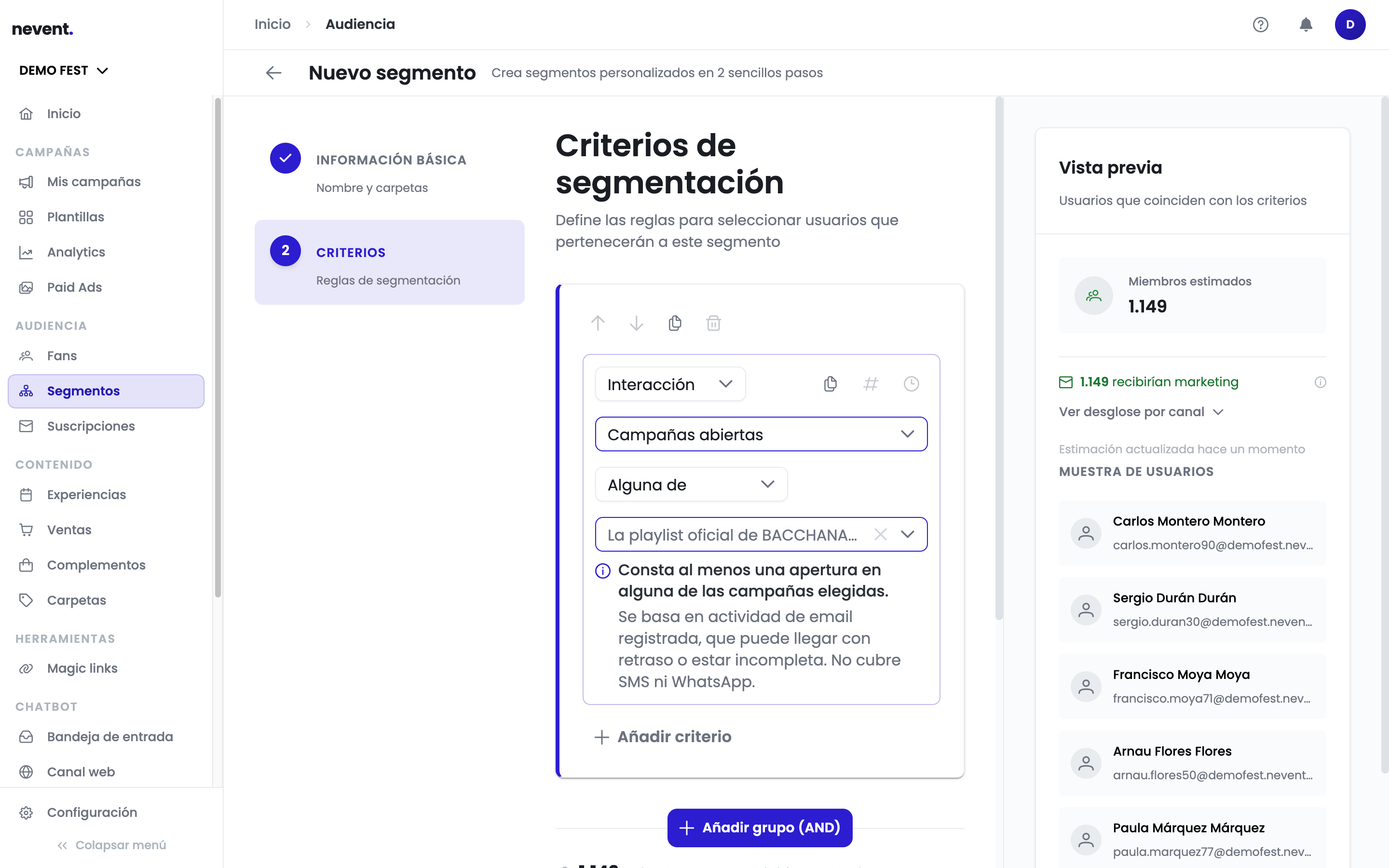
| Campañas abiertas (campaigns opened) | At least one recorded open in the campaign | By campaign |
| Ha abierto campaña con etiqueta (opened campaign with label) | At least one open in any campaign with the chosen label | By label |
| Campañas clickeadas (campaigns clicked) | At least one recorded click in the campaign | By campaign |
| Ha hecho click en campaña con etiqueta (clicked campaign with label) | At least one click in any campaign with the chosen label | By label |
When you pick one, the editor shows underneath exactly what the condition means with the selected operator and which data it relies on.
The four operators
Section titled “The four operators”Each criterion accepts four operators. For the by-campaign criteria:
| Operator | What it includes |
|---|---|
| Any of | Contacts with the activity in any of the campaigns you choose |
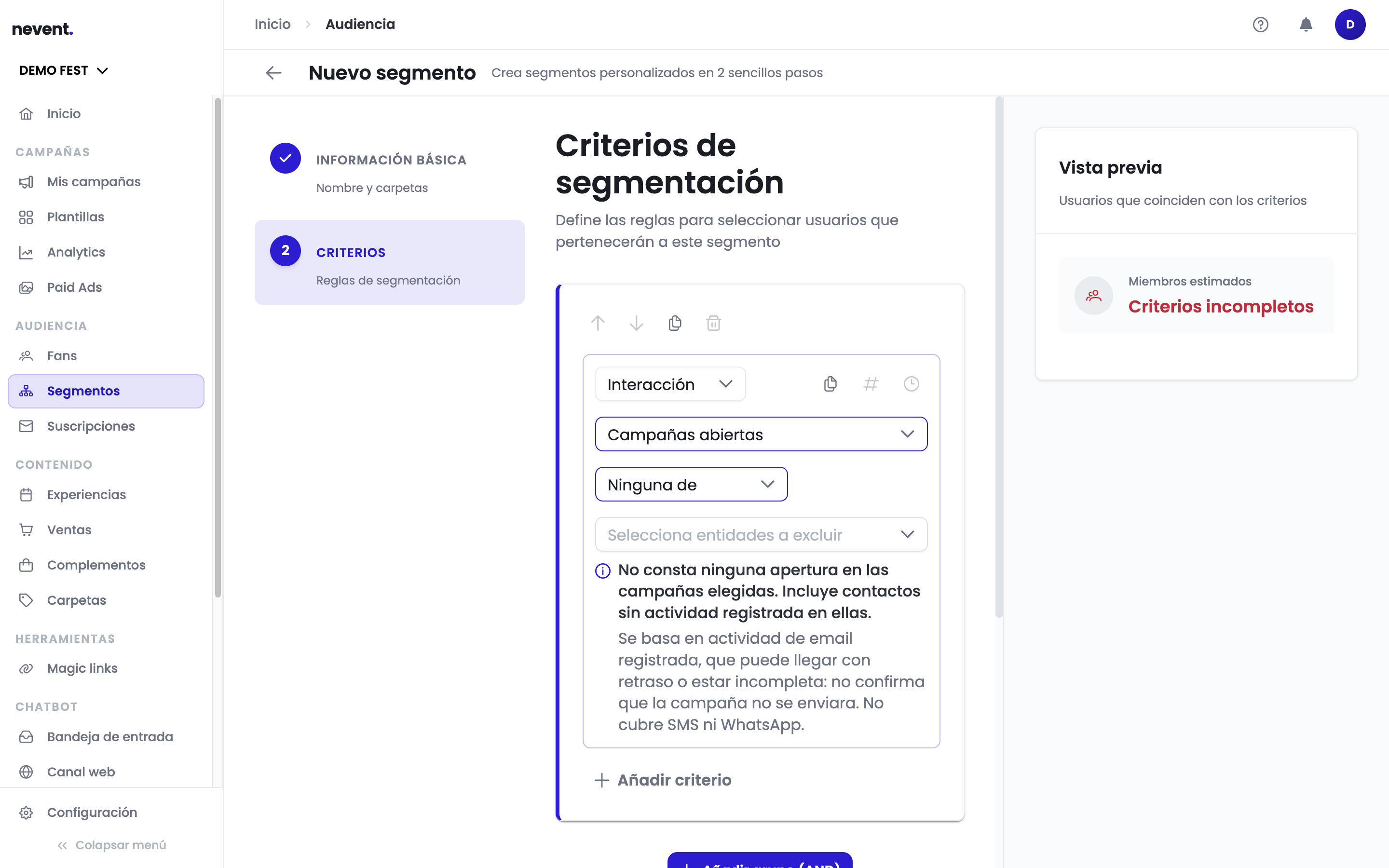
| None of | Contacts without that activity in the chosen campaigns. Includes contacts with no recorded activity in them |
| Any campaign | Contacts with that activity in some campaign, whichever it is |
| No campaign | Contacts without that activity in any campaign. Includes contacts with no recorded activity |
For the by-label criteria the operators are the same under different names: With any of the labels, With none of the labels, Any campaign with a label and No campaign with a label.
What “received” means and other nuances
Section titled “What “received” means and other nuances”These criteria are based on recorded email activity, which has three consequences the editor reminds you of in every condition:
- “Received” is not “sent” or “delivered”. It means there is recorded email activity for that contact in the campaign. That is why a negative operator (“None of”, “No campaign”) does not prove the campaign was not sent: only that there is no recorded activity.
- Activity may arrive late or be incomplete, and it does not cover SMS or WhatsApp. If you want to segment by sends on those channels, this criterion is not the right tool.
- The by-label variants use the labels each campaign has now, not the ones it had when it was sent. If you relabel a campaign, the segment changes with it (labels may also arrive late).
Members versus eligible for sending
Section titled “Members versus eligible for sending”The editor preview and the segment summary talk about members: contacts that meet the segment conditions. Being a member does not guarantee a contact receives a campaign: consent and channel validity are re-checked at send time, so the real audience of a campaign can be smaller than the member count.
How to use the email opens criterion
Section titled “How to use the email opens criterion”An open is the most basic interest signal. Imagine you sent a presale campaign for an indie festival in Madrid and you want to follow up with those who opened but did not buy: you build a segment with fans who opened that specific email AND do not have a ticket. That group already showed interest (they opened) but did not go through to purchase, so a follow-up with more urgency or additional information may convert them.
What does the link clicks criterion do?
Section titled “What does the link clicks criterion do?”A click is a much stronger intent signal than an open alone. A fan who clicked the buy button but did not complete the transaction is in a state of high motivation. You can segment specifically for fans who clicked a particular link in an email to follow up with a personalised message — for example, a discount code expiring in 24 hours.
What is abandoned cart used for?
Section titled “What is abandoned cart used for?”Abandoned cart is one of the most valuable signals in the entire criteria catalogue. A fan who started the ticket purchase process and did not finish has a clear purchase intent: they almost paid. Imagine that in your next Barcelona ticket sale, 8% of visitors to the checkout process do not complete it. With the abandoned cart criterion you can identify those fans and send them a recovery email within the first 24 hours, when their purchase intent is still high. Well-executed abandoned cart campaigns have conversion rates 5 to 15 times higher than a standard sales email.
How to use unsubscribe and bounce to protect your reputation
Section titled “How to use unsubscribe and bounce to protect your reputation”Fans who have opted out or whose emails bounce must not receive any send. Using these criteria as exclusion filters in every campaign is a fundamental deliverability best practice. As well as complying with data protection regulations (GDPR), it prevents damage to your sender score, which ensures the rest of your emails reach the inbox.
Summary
Section titled “Summary”- Digital engagement measures interest signals in your communications: opens, clicks, conversions and abandoned cart.
- Abandoned cart is the highest-intent signal and delivers the highest conversion rates in recovery campaigns.
- Unsubscribe and bounce are mandatory exclusion filters to protect your deliverability.
- Combine engagement with attendance or spend criteria to build even more precise audiences.
Next step
Section titled “Next step”Abandoned cart recovery campaigns are a standard practice in e-commerce and ticket marketing. For reference data on recovery rates, you can consult the Klaviyo documentation on abandoned cart flows.